Troubleshooting Kubernetes Load Balancer Creation Failure Due to Azure Policy Restrictions
A real-world Kubernetes troubleshooting incident where Azure Policy restrictions blocked Load Balancer creation because public IPs were denied, affecting cloud-native service exposure in an AKS environment.
Sowmya Narayan
5/10/20263 min read
Introduction
In enterprise Kubernetes environments, infrastructure governance policies are critical for maintaining security and compliance.
However, strict cloud policies can sometimes unintentionally block application deployments if Kubernetes resources are not configured correctly.
We recently encountered an issue where a Kubernetes LoadBalancer service failed to provision in an Azure Kubernetes environment because Azure Policy denied creation of public IP-based load balancers.
In this blog, I’ll explain:
how the issue was detected
the actual Azure Policy violation
why Kubernetes failed to provision the Load Balancer
troubleshooting observations
how re-syncing the deployment pipeline resolved the issue
The Problem
A database load balancer service failed during provisioning.
The affected resource was:
crdb-dolphin-db-lb
Kubernetes repeatedly generated errors while trying to sync the Load Balancer resource.
The application deployment remained stuck because the service could not expose the required endpoint.
Error Observed
The Kubernetes events showed:
Error syncing load balancer:
failed to ensure load balancer:
403 Forbidden
RequestDisallowedByPolicy
The cloud provider rejected the Load Balancer creation request due to policy enforcement.
Root Cause
The AKS cluster attempted to provision a Load Balancer with a public IP address.
However, the Azure subscription had a security policy configured to deny public IP usage for Load Balancers.
The policy enforcement blocked the deployment.
The error specifically indicated:
Load Balancers should not have public IPs
This caused Azure to reject the Kubernetes LoadBalancer resource creation request.
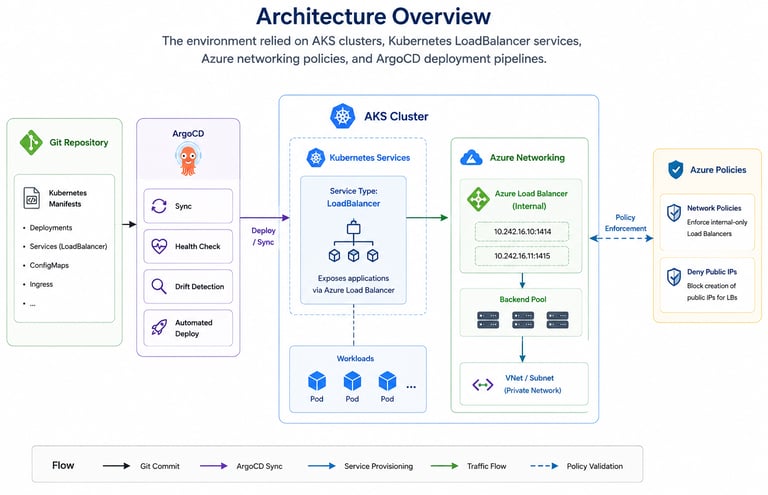
Architecture Overview
The environment relied on:
AKS clusters
Kubernetes LoadBalancer services
Azure networking policies
ArgoCD deployment pipelines
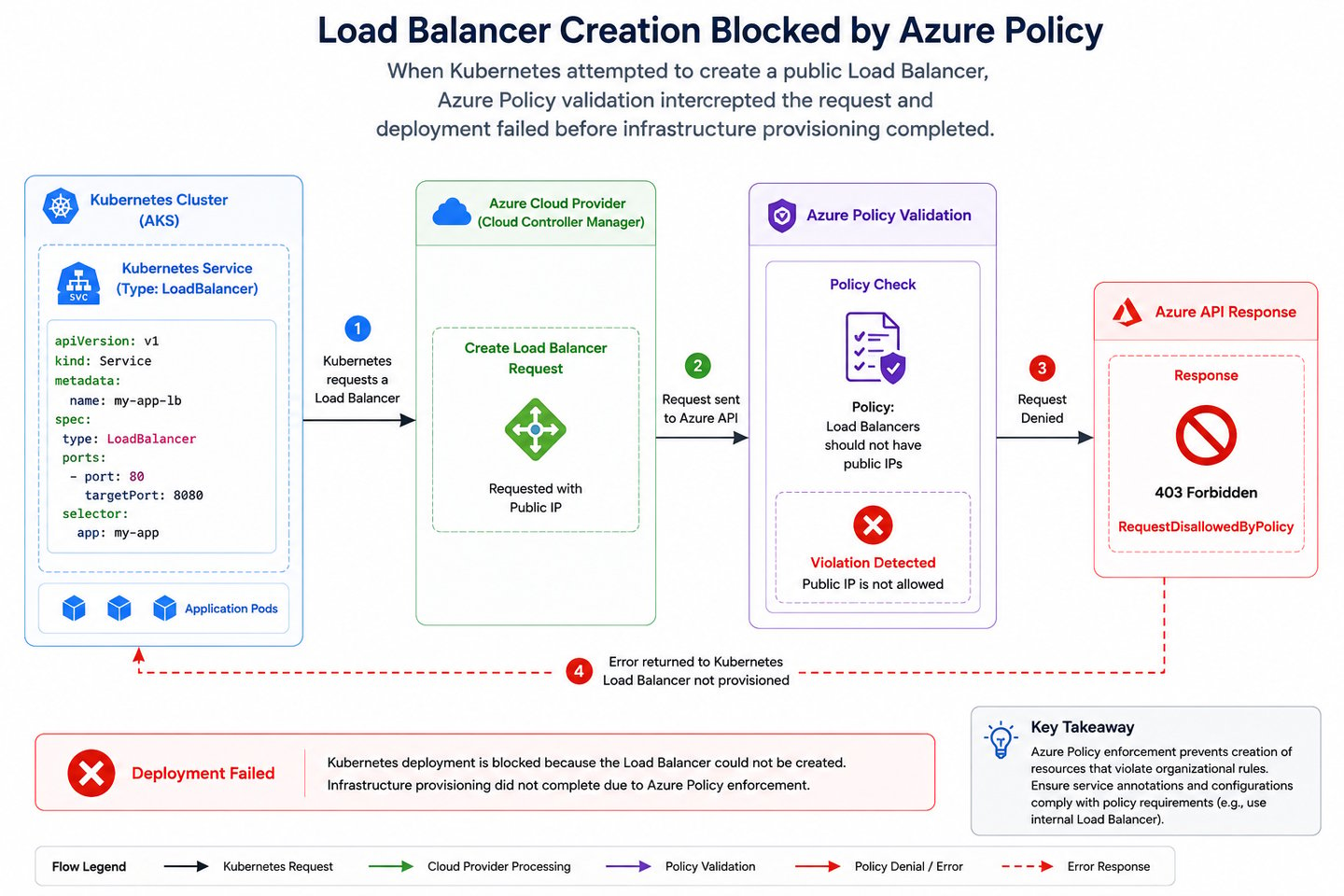
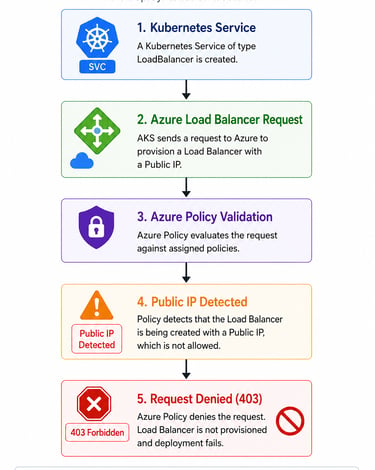
When Kubernetes attempted to create a public Load Balancer:
Azure Policy validation intercepted the request
deployment failed before infrastructure provisioning completed
Why the Failure Happened
In Kubernetes, services of type:
type: LoadBalancer
can automatically provision cloud load balancers.
If internal annotations are missing, Azure may attempt to create:
a public-facing Load Balancer
associated public IP resources
Since the environment enforced strict internal-only networking policies, Azure denied the request.
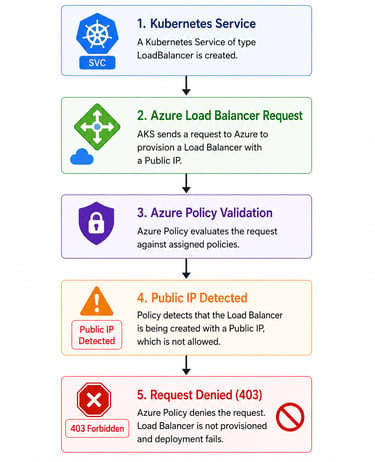
Azure Policy Violation Flow
The deployment flow became:
Investigation Findings
During troubleshooting, the operations team reviewed:
Kubernetes service manifests
Azure policy assignments
AKS load balancer annotations
ArgoCD deployment state
Kubernetes events
The policy assignment clearly enforced:
Internal Load Balancers should not have public IPs
This explained why Azure rejected the provisioning request.
Resolution
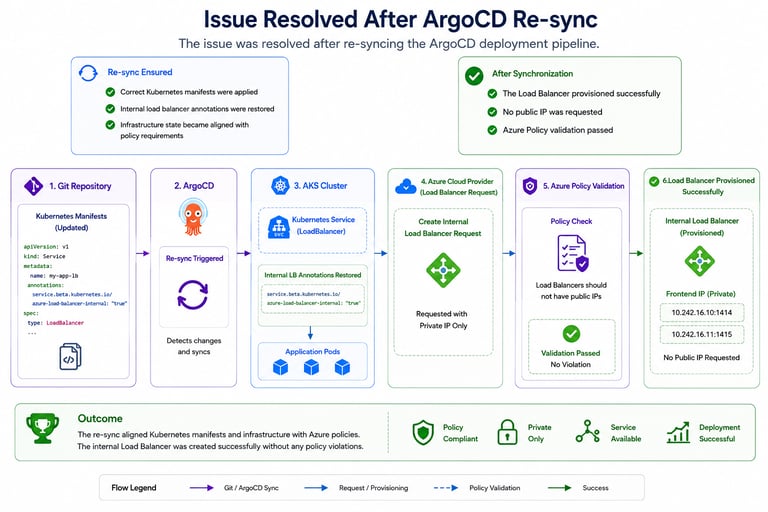
The issue was resolved after re-syncing the ArgoCD deployment pipeline.
The re-sync ensured:
correct Kubernetes manifests were applied
internal load balancer annotations were restored
infrastructure state became aligned with policy requirements
After synchronization:
the Load Balancer provisioned successfully
no public IP was requested
Azure Policy validation passed
Correct Internal Load Balancer Configuration
In Azure Kubernetes Service, internal load balancers typically require annotations similar to:
service.beta.kubernetes.io/azure-load-balancer-internal: "true"
This ensures Kubernetes provisions:
internal-only load balancers
private frontend IPs
compliant infrastructure resources
instead of public-facing endpoints.
Operational Learnings
This incident highlighted several important operational lessons.
1. Cloud Governance Policies Directly Affect Kubernetes Deployments
Infrastructure policies can block Kubernetes resource provisioning even when manifests appear valid.
2. Internal vs Public Load Balancers Matter
Missing annotations can unintentionally cause:
public IP allocation attempts
policy violations
failed deployments
3. Kubernetes Events Are Extremely Valuable
The Kubernetes event logs immediately revealed:
Azure Policy denial
HTTP 403 response
infrastructure provisioning failure
4. GitOps Synchronization State is Critical
Deployment drift between:
Git manifests
cluster resources
cloud infrastructure
can create unexpected provisioning failures.
5. Security Policies Must Be Considered During Platform Design
Enterprise cloud environments often enforce:
private networking
restricted ingress
public IP denial policies
Application deployments must align with these constraints.
Preventive Improvements
Following the incident, teams reviewed:
AKS load balancer annotations
ArgoCD synchronization validation
Kubernetes deployment templates
Azure Policy awareness
infrastructure governance checks
Additional deployment validation rules were also discussed to detect public IP configuration issues before deployment.
Final Thoughts
Kubernetes deployments in enterprise cloud environments are deeply tied to infrastructure governance and security policies.
In this incident:
Kubernetes attempted to provision a public Load Balancer
Azure Policy denied the request
service provisioning failed until deployment synchronization was corrected
Strong observability, policy awareness, and GitOps consistency are essential for operating secure and reliable Kubernetes platforms.
Get in touch
techgalari@gmail.com
☕ Enjoying TechGalary?
Support the creation of free technology guides, tutorials and open-source projects.