Troubleshooting Artifactory 503 Errors and Oracle Account Lock Issues in Kubernetes
A real-world DevOps troubleshooting guide on resolving Artifactory 503 Service Unavailable errors caused by Kubernetes secret mismatches and Oracle database account lock issues in containerized environments.
Sowmya N
5/9/20263 min read
Introduction
Production outages in containerized environments are not always caused by infrastructure failures. Sometimes, a small configuration mismatch can bring down critical services.
We recently faced a production issue where JFrog Artifactory suddenly became unavailable with:
503 Service Unavailable
During investigation, we discovered that the issue was related to Kubernetes secrets and database authentication mismatches.
At the same time, we also encountered an Oracle database issue where application accounts became locked due to repeated invalid authentication attempts.
In this blog, I’ll explain:
the root cause behind the Artifactory outage
how Kubernetes secrets caused authentication failures
how we resolved the issue
how we handled Oracle account lock scenarios
lessons learned and preventive measures
The Problem
One morning, Artifactory services suddenly became unavailable.
Users started receiving:
503 Service Unavailable
Applications depending on artifact downloads also began failing.
This impacted:
CI/CD pipelines
image pulls
dependency downloads
deployment workflows
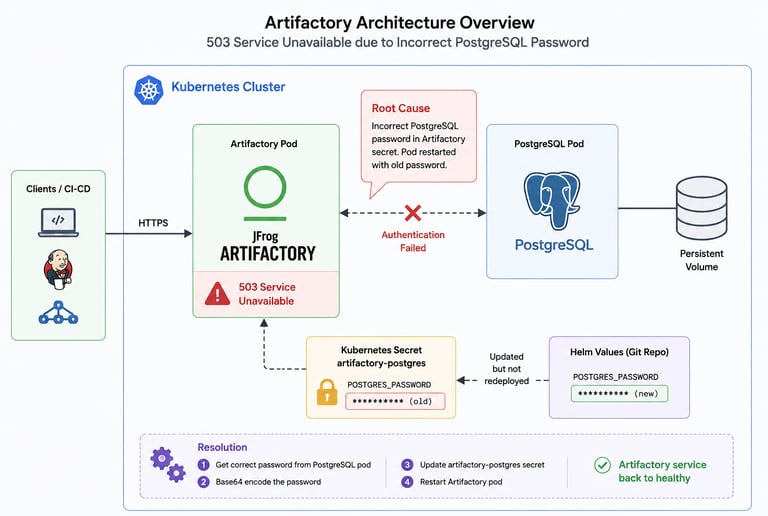
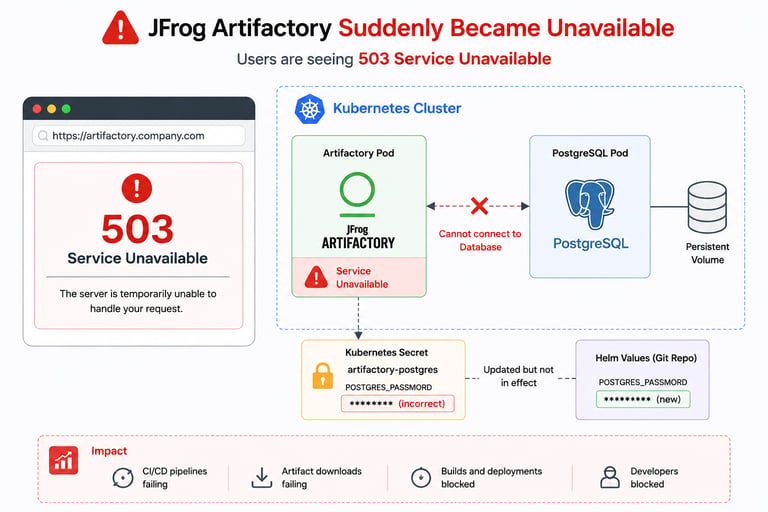
Architecture Overview
Initial Investigation
During troubleshooting, we checked:
pod status
Kubernetes events
container logs
database connectivity
secrets configuration
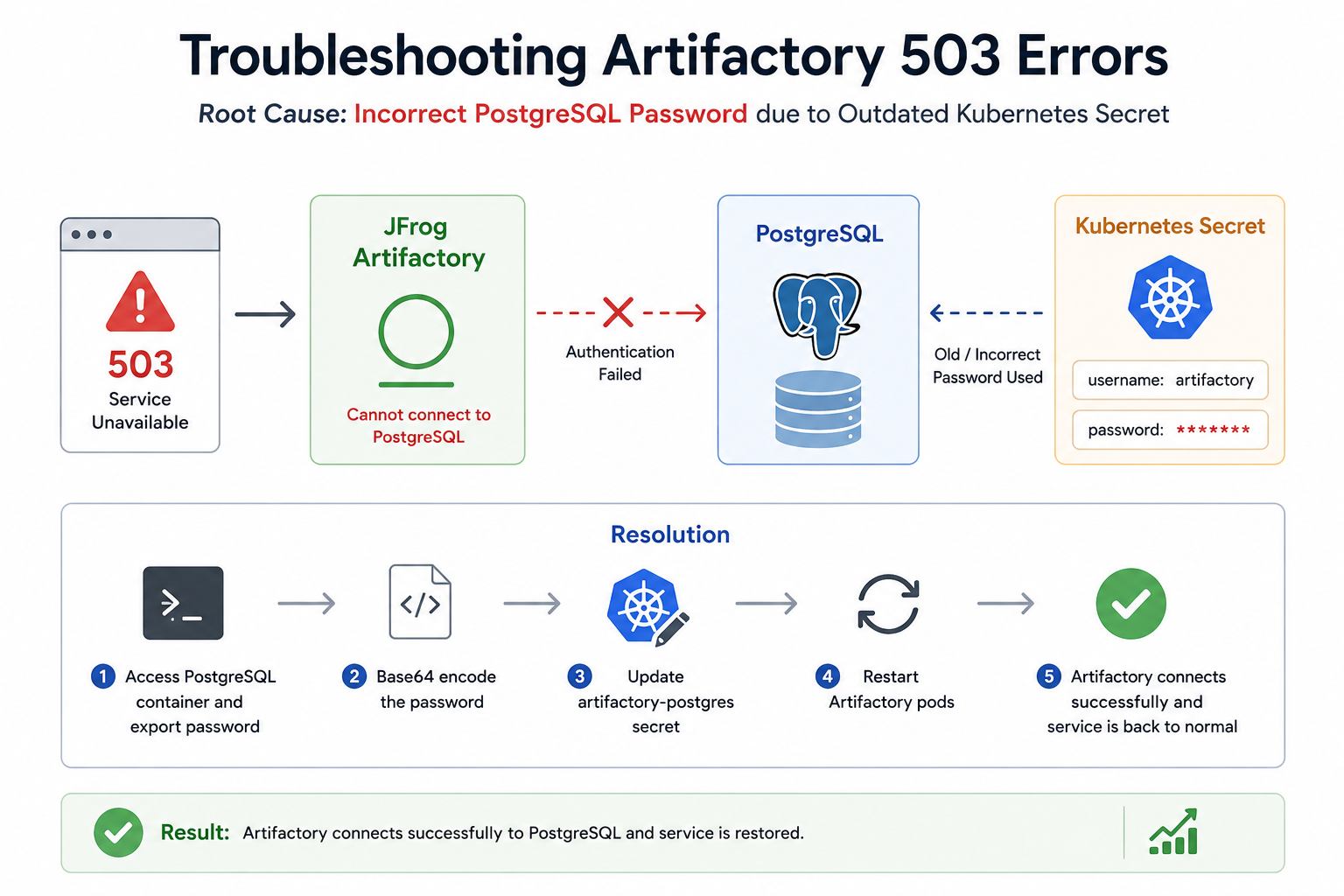
The Artifactory pods were restarting repeatedly because database authentication was failing during startup.
Root Cause Analysis
After deeper investigation, we identified the actual issue.
Someone had updated the Helm secret in the deployment code repository with a new PostgreSQL password.
However:
the Artifactory container was never redeployed afterward
the running container continued using the old password
once the pod restarted, it attempted to connect using outdated credentials
This caused database authentication failures during startup, leading to: 503 Service Unavailable
Resolution Steps
We verified the actual PostgreSQL password directly from the PostgreSQL container.
Step 1 — Access PostgreSQL Container
oc rsh postgres-pod
Step 2 — Export Existing Password
Retrieve the active database password from the container environment variables.
export
Step 3 — Base64 Encode Password
Kubernetes secrets require Base64 encoding.
echo -n 'password' | base64
Step 4 — Update Kubernetes Secret
Edit the Artifactory PostgreSQL secret:
oc edit secret artifactory-postgres
Replace the incorrect password with the correct Base64-encoded value.
Step 5 — Restart Artifactory Pods
After updating the secret, restart the pods:
oc delete pod <artifactory-pod>
The application successfully connected to PostgreSQL and recovered normally.
Oracle Database Issue
While troubleshooting related systems, we also encountered another database authentication issue:
SQLException: ORA-28000: the account is locked
Root Cause
Although the exact trigger was uncertain, the most likely reason was:
multiple invalid login attempts
repeated authentication retries from applications
account lock policy enforcement in Oracle
Resolution Steps
Step 1 — Access Oracle Container
oc rsh pcf-oracle-0
Step 2 — Connect as SYSDBA
source ~/.bashrc
sqlplus / as sysdba
Step 3 — Unlock User
ALTER USER uwork ACCOUNT UNLOCK;
Step 4 — Exit SQLPlus
exit
The application resumed normal database operations afterward.
Query to Check Locked Accounts
To identify locked Oracle accounts:
SET LINESIZE 200
COLUMN username FORMAT A20
COLUMN account_status FORMAT A16
COLUMN created FORMAT A15
COLUMN lock_date FORMAT A15
COLUMN expiry_date FORMAT A15
SELECT username,
account_status,
created,
lock_date,
expiry_date
FROM dba_users
WHERE account_status != 'OPEN';
Lessons Learned
This incident highlighted several important operational lessons.
1. Secret Updates Must Be Followed by Redeployments
Updating Kubernetes secrets alone is not enough if applications cache credentials during startup.
2. Monitor Restart Events Carefully
Pod restarts can expose hidden configuration mismatches that remain unnoticed for weeks or months.
3. Validate Secret Synchronization
Ensure:
Helm values
Kubernetes secrets
running containers
database credentials
all remain synchronized.
4. Add Monitoring for Database Authentication Failures
Early alerting for repeated authentication failures can prevent account lock scenarios.
Preventive Measures
After resolving the issue, we implemented:
deployment validation checks
secret synchronization reviews
restart testing after secret updates
monitoring for authentication failures
better operational documentation
Final Thoughts
Small configuration mismatches in Kubernetes environments can lead to major production outages.
In this case:
an outdated PostgreSQL password caused Artifactory downtime
repeated invalid logins triggered Oracle account locks
The issue reinforced the importance of:
secret management
deployment validation
restart testing
operational observability
For DevOps teams managing containerized enterprise platforms, proper secret lifecycle management is critical for maintaining application reliability.
Get in touch
techgalari@gmail.com
☕ Enjoying TechGalary?
Support the creation of free technology guides, tutorials and open-source projects.