Solving Helm Repository Performance Issues with Automated Chart Cleanup in ChartMuseum
A real-world DevOps troubleshooting guide on reducing Helm repository size, improving CI/CD performance, and automating old chart cleanup in ChartMuseum using retention policies.
Sowmya N | TechGalary
5/7/20264 min read
Introduction
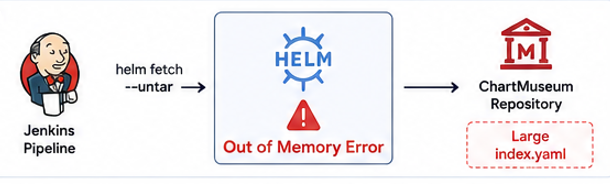
If your Jenkins pipelines suddenly start failing during Helm operations with errors like: fatal error: runtime: out of memory
while executing commands such as: helm fetch --untar then your Helm repository itself might be the hidden problem.
We recently faced this exact issue while using ChartMuseum as our internal Helm repository. After investigation, we discovered that the actual root cause was an oversized index.yaml file caused by years of accumulated Helm chart versions.
In this blog, I’ll explain:
What caused the issue
Why Helm repositories become slow over time
How this affected Jenkins pipelines
The cleanup strategy we implemented
Best practices for Helm chart retention
The Problem
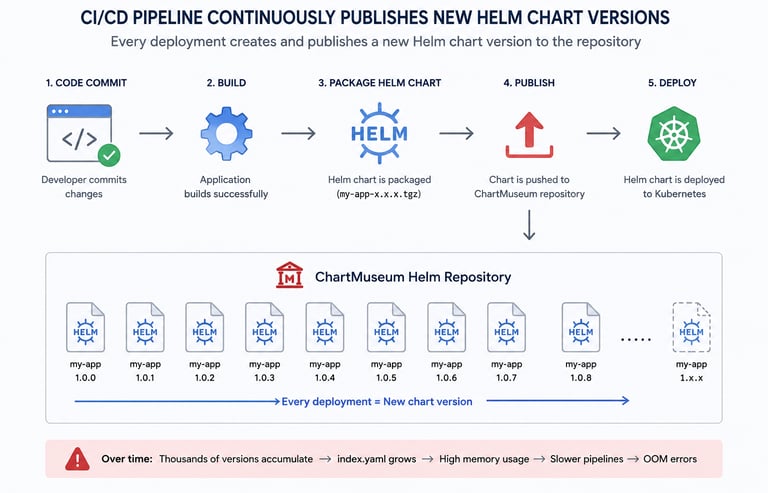
Our CI/CD pipelines continuously published new Helm chart versions during every deployment.
Example:
my-app-1.0.1.tgz
my-app-1.0.2.tgz
my-app-1.0.3.tgz
Since we were using ChartMuseum, every published chart version was added to the repository metadata file: index.yaml
Over time:
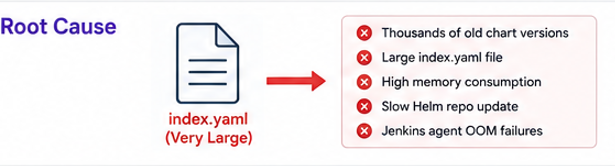
thousands of old chart versions accumulated
index.yaml became extremely large
Helm repository operations became slower
Jenkins agents started consuming excessive memory
Eventually, some Jenkins builds failed with: fatal error: runtime: out of memory during: helm fetch --untar
Root Cause Analysis
Initially, it looked like a Jenkins memory issue.
But after deeper analysis, the real problem turned out to be:
oversized Helm repository metadata
excessive old chart versions
high memory usage while Helm processed repository indexes
This especially impacts:
Kubernetes-based Jenkins agents
low-memory CI/CD containers
parallel build environments
The Helm repository itself had become bloated over time.
Existing Repository Structure
We were storing:
development charts
QA releases
production releases
snapshot builds
inside ChartMuseum.
Example:
my-app:
1.0.1
1.0.2
1.0.3
...
1.0.742
Most historical versions were no longer required, but they still remained inside the repository metadata.
The Solution
To solve this issue, we decided to implement an automated Helm chart cleanup policy using the ChartMuseum DELETE API.
The plan was simple:
Read all chart versions
Keep only the latest required versions
Delete older unused versions
Reduce the size of index.yaml
Understanding ChartMuseum DELETE API
ChartMuseum provides APIs to manage chart versions.
List all charts
curl https://chartmuseum.example.com/api/charts
Get chart versions
curl https://chartmuseum.example.com/api/charts/my-app
Delete specific chart version
curl -X DELETE \
https://chartmuseum.example.com/api/charts/my-app/1.0.12
This API became the foundation of our cleanup automation.
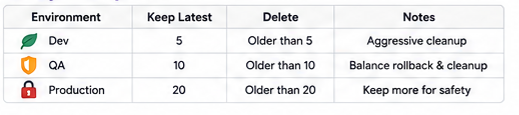
Cleanup Strategy
We introduced retention policies based on environments.
This helped us:
reduce repository size
improve Helm performance
stabilize Jenkins pipelines
reduce memory usage
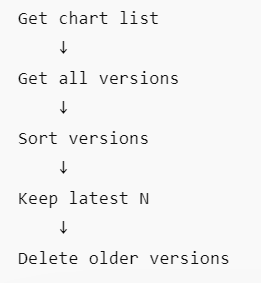
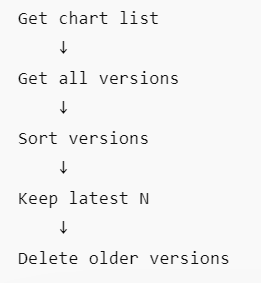
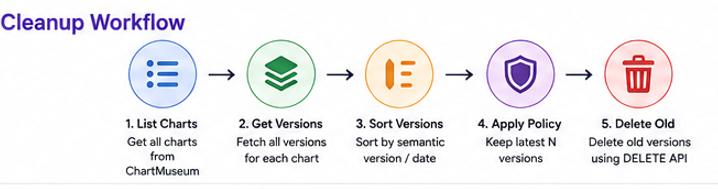
Cleanup Pipeline Design
Instead of manually deleting charts, we created a separate cleanup pipeline.
Pipeline Flow
This allowed us to safely clean historical data without affecting active deployments.
Important Safeguards
Before deleting any charts, we added several safety checks.
1. Dry Run Mode
Initially, the cleanup pipeline only printed what would be deleted:
DRY_RUN=true
This helped validate cleanup logic safely.
2. Protect Active Versions
We ensured the cleanup never deleted:
currently deployed versions
stable production releases
tagged release builds
Example:
helm list -A
3. Semantic Version Sorting
Simple string sorting can produce incorrect results:
1.0.10
1.0.2
Instead, we used semantic version sorting to correctly identify older versions.
Why We Did Not Integrate Cleanup Directly Into the Publish Pipeline
Initially, we considered deleting old versions immediately after publishing new charts.
Example:
Publish chart
↓
Delete oldest version
However, we decided against this approach.
Reasons
rollback versions may still be required
failed deployments can create operational risks
debugging becomes difficult if versions disappear immediately
Instead, we implemented:
scheduled cleanup jobs
configurable retention policies
safer operational maintenance
Results After Cleanup
After implementing automated chart cleanup:
Helm repository size reduced significantly
index.yaml became much smaller
Jenkins OOM failures disappeared
Helm fetch operations became faster
CI/CD stability improved
Best Practices
If you are managing Helm repositories at scale, I strongly recommend:
Use Retention Policies
Never allow unlimited chart accumulation.
Separate Cleanup Jobs
Avoid cleanup logic inside deployment pipelines.
Use:
Jenkins scheduled jobs
Kubernetes CronJobs
maintenance pipelines
Keep Production Releases Longer
Development charts can be aggressively cleaned, but production releases should have longer retention periods.
Monitor Repository Growth
Track:
index.yaml size
repository response time
Helm fetch latency
chart count growth
Final Thoughts
Helm repositories are often ignored until they start affecting CI/CD performance.
A simple automated cleanup strategy can:
improve Jenkins stability
reduce memory usage
speed up Helm operations
keep repositories manageable
For teams using ChartMuseum in enterprise environments, implementing Helm chart retention policies should be considered an essential operational practice rather than an optional optimization.